

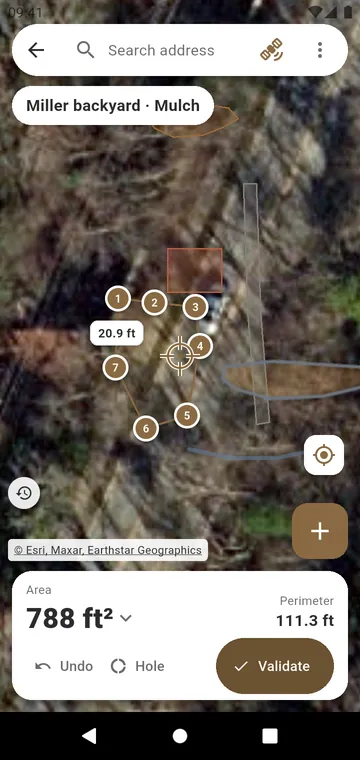
Draw it on the satellite view
Draw on the satellite view: tap the corners of the bed, drag them under a magnifier, Undo a step. Hole takes out a pond or a patio inside. Validate gives the zone its area. The other zones of the project show on the map in the color of their material, and the imagery date is shown: pick an older year when trees hide the edge.
Type the dimensions
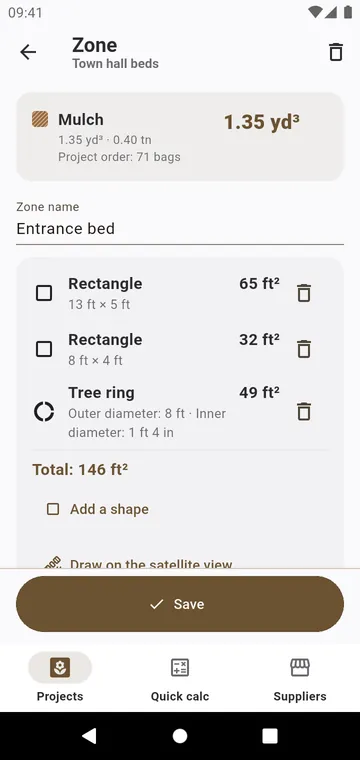
Enter the dimensions, then Add a shape: Rectangle, Circle, Triangle (Base × height or Three sides) or Tree ring. The shapes add up; Subtract this shape takes one out, like a patio inside a bed. Feet and inches are typed as you measure them: 12' 6". A wall or edging takes lengths: Add up several lengths.
Walk around it
Under trees, Walk around it follows the outline by GPS, or Corner by corner averages your position at each corner. The result carries a ± figure: a good estimate for buying materials, not a survey. Use a saved measurement brings back an area measured before.